'

7 WAYS TO AVOID PC CRASH


1-Hardware conflicts


.

2-Bad RAM


3-Heat is thy enemy


4-Not enough power


5-Fragmented hard drive


6-A cluttered Registry


7-The dreaded virus

CLICK HERE FOR MORE OF INFORMATION ON HOW TO SOLVE THE ABOVE ISSUES

THANKS TO PCMAG


Detecting and repairing disk errors

Detecting and repairing disk errors

You can use the Error-checking tool to check for file system errors and bad sectors on your hard disk.
  1. Open My Computer, and then select the local disk you want to check.
  2. On the File menu, click Properties.
  3. On the Tools tab, under Error-checking, click Check Now.
  4. Under Check disk options, select the Scan for and attempt recovery of bad sectors check box.
 Notes
  • To open My Computer, click Start, and then click My Computer.
  • All files must be closed for this process to run. If the volume is currently in use, a message box will appear prompting you to indicate whether or not you want to reschedule the disk checking for the next time you restart your system. Then, the next time you restart your system, disk checking will run. Your volume will not be available to perform other tasks while this process is running.
  • If your volume is formatted as NTFS, Windows automatically logs all file transactions, replaces bad clusters, and stores copies of key information for all files on the NTFS volume.

Windows Activation& WAT

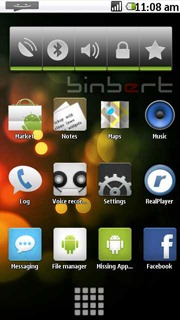
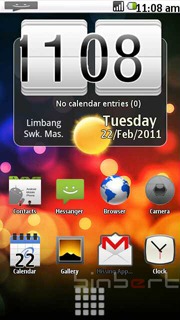
Install Android 2.1 UI on Nokia S60v5 mobile


Android NokiaAndroid 5800
I was searching for a solution to run android on my Nokia 5230. I found some YouTube videos with tag Android and Nokia. After a long search I found some solution to tweak the user interface of Nokia with an Android. Here are the steps to change Nokia UI to an Android UI on Symbian 60V5. Remember this will change only the User interface. You can always uninstall.
1. Download GDesk.rar from following link
http://www.ziddu.com/download/9183034/GDesk.rar.html
2. Extract  and rename the folder as   “+GDesk”
3. Copy “+GDesk” folder to your phone memory
4. Go to +GDesk\Gdesk v0.33g Install SIS And install all applications, files listed below
GDesk.0.33g.SIS
GDeskAgnViewS60.0.33g.sis
GDeskClockS60.0.33g.sis
GDeskInfoViewS60.0.33g.sis
GDeskNotepadS60.0.33g.sis
GDeskShortcutsS60.0.33g.sis
GDeskTaskManS60.0.33g.sis
Normally Phone will not allow you to install GDeskTaskManS60.0.33g.sis. It will give following error
Certificate is expired
You have to sign the application and install it
How can you sign an application? Generate a certificate using this site and sign it.
Or try a self signing application  using application called FreeSigner
5. Now run GDesk from your installed applications.
6. Tap your screen, then click on Design >>  Load Design
select Android 2.1.gdd from your phone
Location : Memory card\+GDesk\Android 2.1.gdd
7. Now go to options and tick following option for better result
Replace Main
Full Screen
Hide title caption
Disable menu tap
It is compactable with Nokia 5230, 5800, 5235 and 5233

Muammil. Powered by Blogger.